
Manual Setup for Mac OS 9
Required Info:
Dialup Number = 0845 6621309
Username = scottish -- Password = internet
Modem Settings
The following settings are found in three Control Panels: Remote Access (called PPP in older versions of MacOS), Modem and TCP/IP. All of these can be found through the Control Panels item in your Apple Menu.
Please note: your Control Panels may not look exactly like the ones below, but the important parts are the same. In particular, don't worry if there is a name in parenthesis after the name of the Control Panel, either in the screenshots provided on this page or in your Control Panels.
Remote Access Control Panel
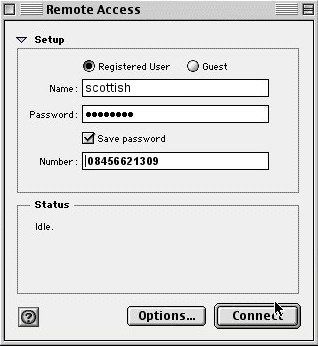
This is the default view you will get when you open the Remote Access (or PPP) Control Panel.
- Name: should be scottish
- Password: should be internet. Note that it becomes bullets after you enter it.
- Save Password should be checked, unless you'd rather type in your password each time you connect.
- Number: 0845 6621309
Options
By clicking on the 'Options...' button at the bottom of the Remote Access Control Panel, you'll get the following window, with three options: Redialling, Connection and Protocol.
Redialling Options
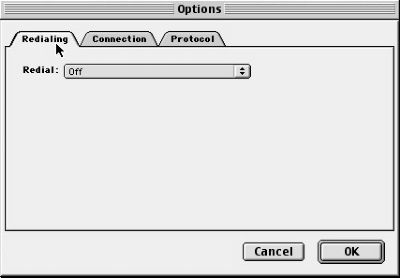
Redialling can be turned on if desired, it simply means that machine will automatically reattempt to connect, should it receive an engaged tone.
Connection Options:
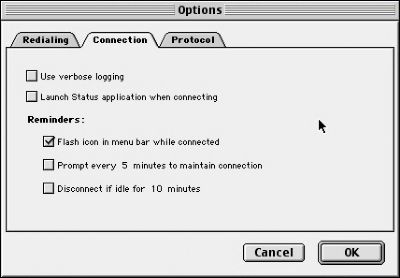
Again, how you change these settings is completely up to you, we suggest ticking "Flash icon" and "Disconnect if idle", as these will keep you aware of your connection and automatically disconnect your machine if you forget to, thus saving you money.
Protocol Options:
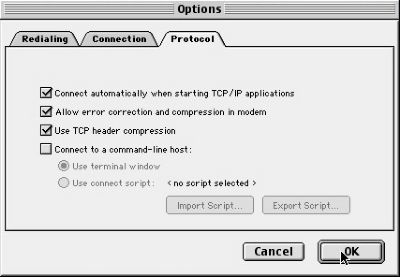
We recommend the following settings:
- Use protocol: PPP. Sometimes, especially in newer versions of the OS, this is not an option -- PPP is automatically used.
- Connect automatically: ticked. This will connect you whenever you start to check your mail or browse the web.
- Allow error correction and compression: ticked.
- Use TCP header compression: ticked.
- Connect to a command-line host: unticked.
Modem Control Panel:
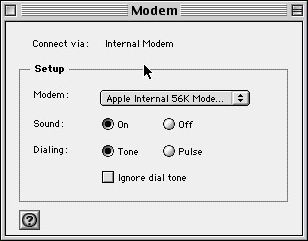
The Modem Control Panel tells Remote Access how to communicate with your modem. As such, set-ups will vary as computers are never the same. The set-up you see above is for an iBook, using its internal modem. You should set your Modem Control Panel as follows:
- Connect via: whichever port your modem is plugged into -- printer, modem, USB or internal.
- Modem: select whichever driver is closest to your modem. If you don't have a driver for your modem, try one of the more-generic settings, like Hayes Accura 56K or US Robotics Universal.
- Sound: can be on or off, however you desire. Having the sound on is useful for troubleshooting.
- Dialling: should be set to tone.
- Ignore dial tone should not be ticked.
TCP/IP Control Panel:
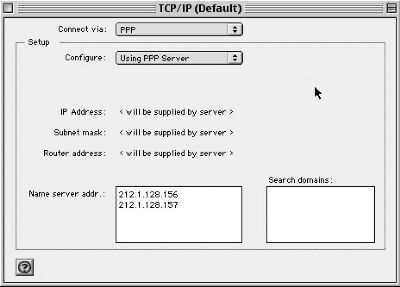
The TCP/IP window should have the following settings:
- Connect via: PPP
- Configure: Using PPP server
- Name server addr.: 212.1.128.156 (new line) 212.1.128.157
- Additional Search domains: can be left blank
That's it -- you're now set to dial in and surf the Internet.
