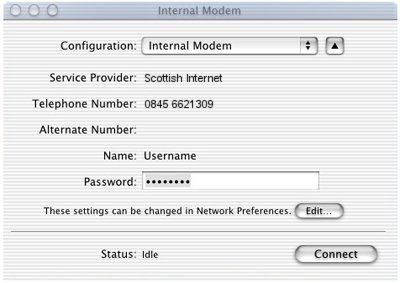
Manual Setup for Mac OS X
Required Info:
Dialup Number = 0845 6621309
Username = scottish -- Password = internet
All the preferences shown below can be found by going to the Apple menu, selecting 'System Preferences...' and clicking on the 'Network' pane.
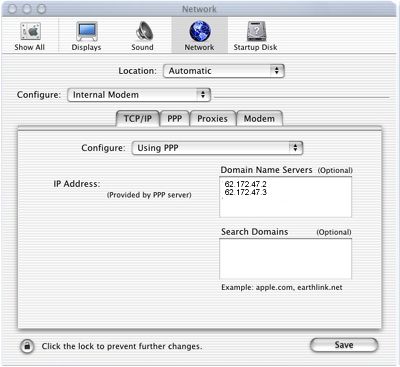
Using the modem selection (in this case, the internal modem in a Powerbook G3), it is fairly easy to set up dial-in networking for MacOS X. Under the TCP/IP selection, use the following settings:
- Configure: Using PPP.
- Domain Name Servers: 62.172.47.2 (new line) 62.172.47.3
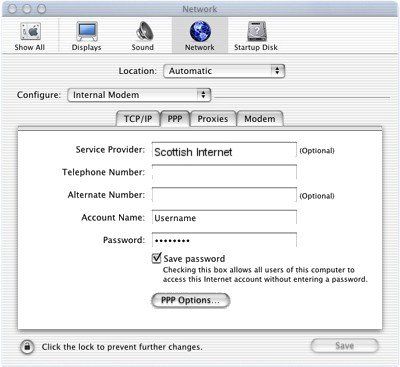
Clicking on the PPP tab will allow you to fill out the following information:
- Service Provider: Scottish Internet
- Telephone Number: 0845 6621309
- Alternate Number: leave blank
- Account Name: scottish
- Password: internet
- Save Password should be checked, unless you prefer to type in your password each time you connect.
The PPP Options should look as below:
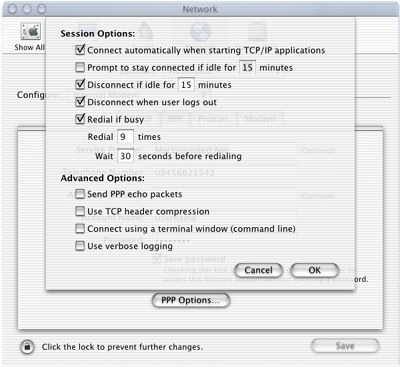
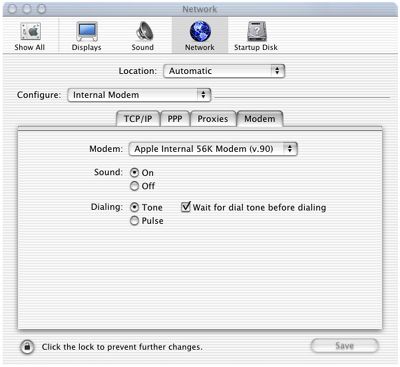
The Modem options should look like this:
Your completed Internet Connect Application should appear as below, MacOS X is now ready to connect: